 Orbit
Shared work.
A clearer picture.
A collaboration workspace connecting people, plans, files, and decisions, so everyone can see how the work moves forward.
- Project
- Independently designed & built SaaS product
- My role
- Product definition, IA, UX/UI, implementation direction
- Scope
- Team workflows · Desktop & mobile
- Timeline
- October 2026
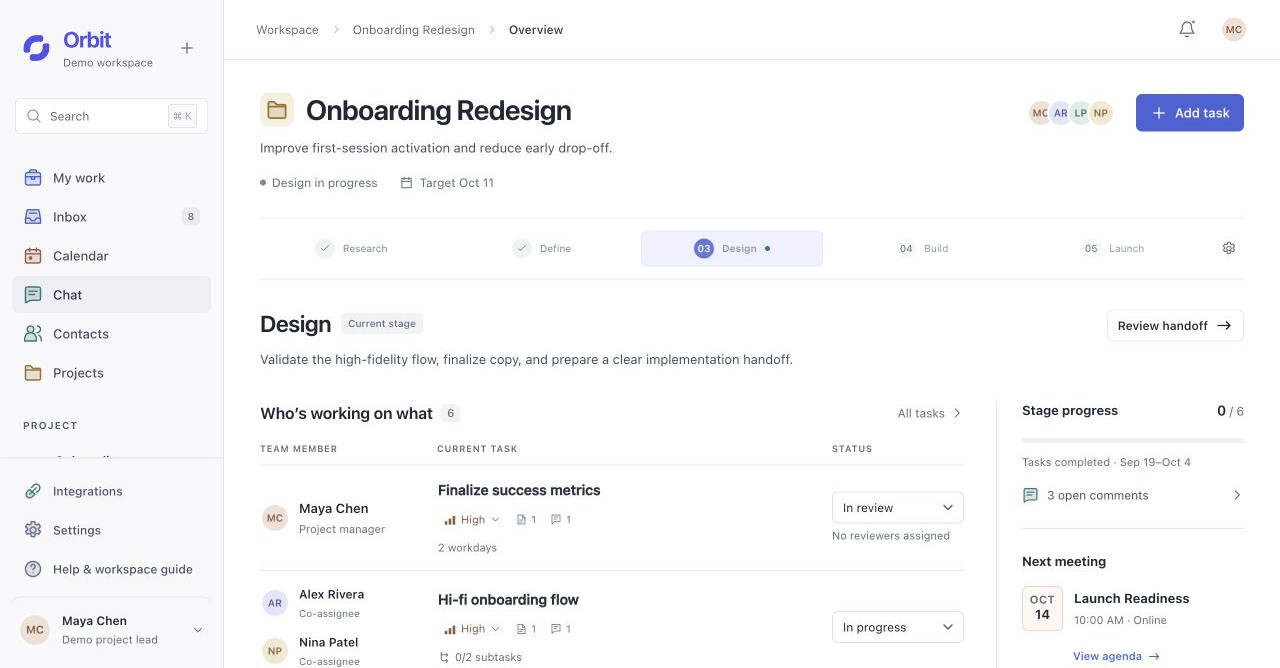
I designed the information architecture, collaboration rules, and interfaces, and collaborated with AI coding tools to implement and iterate on the product. The working product connects planning, shared files, meetings, and AI-assisted updates, with persistent data and responsive desktop and mobile views.
The starting point
Connect the work.
Make collaboration visible.
Orbit grew out of my experience working in a studio: discussing work in meetings, agreeing responsibilities, sharing files, and iterating each week. When these activities sit in separate places, teammates have to piece together who owns the work, which version is current, and what happens next.
I built Orbit around a shared project structure. Stages connect the plan to tasks; tasks connect people to files and feedback; meetings and conversations retain the reasons behind decisions. AI helps organize this information, while people keep control of changes to the work.
Each piece of work should make three things clear: who owns it, where it stands, and who takes the next step.
Screens and interactions come from the working product. The onboarding project uses sample data for demonstration.
Information architecture
A personal way in.
A shared project underneath.
I separated workspace navigation from project navigation. A teammate can find their own work across projects, then move into one project without losing its people, stage, or history.
- My workMy responsibilities
- InboxUpdates needing attention
- CalendarPersonal and shared time
- ChatProject channels and DMs
- ContactsPeople I connect with
- ProjectsProjects I have joined
- OverviewWhere are we now?
- StagesWhat is the plan?
- FilesWhich work are we reviewing?
- MeetingsWhat did we discuss?
- PeopleWho is doing what?
- Decisions & updatesWhat changed, and why?
Persistent accessSearch · Settings · Integrations · Help · Account
Organize around the work
Project → stage → task gives each piece of work a place. Files, feedback, and meeting records link back to that context instead of becoming isolated destinations.
Separate connection from access
Contacts support relationships and private conversation. Joining a project is a separate, accepted invitation. Knowing someone does not expose their other projects.
Offer more than one way back
A task can be reached from My work, a stage, a person, or an attached chat message. These entry points open the same task, preserving its identity and history.
See the plan.
Find your part in it.
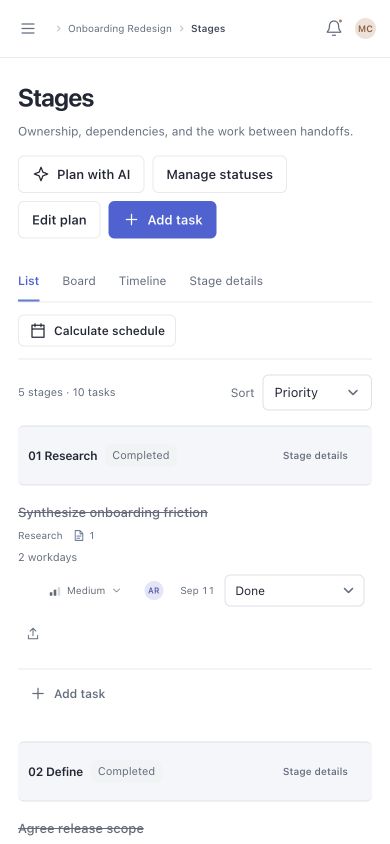
Orbit supports daily teamwork as well as PM coordination. Overview shows the current stage and who is working on what. Stages makes the plan inspectable through a list, board, or timeline of the same tasks.
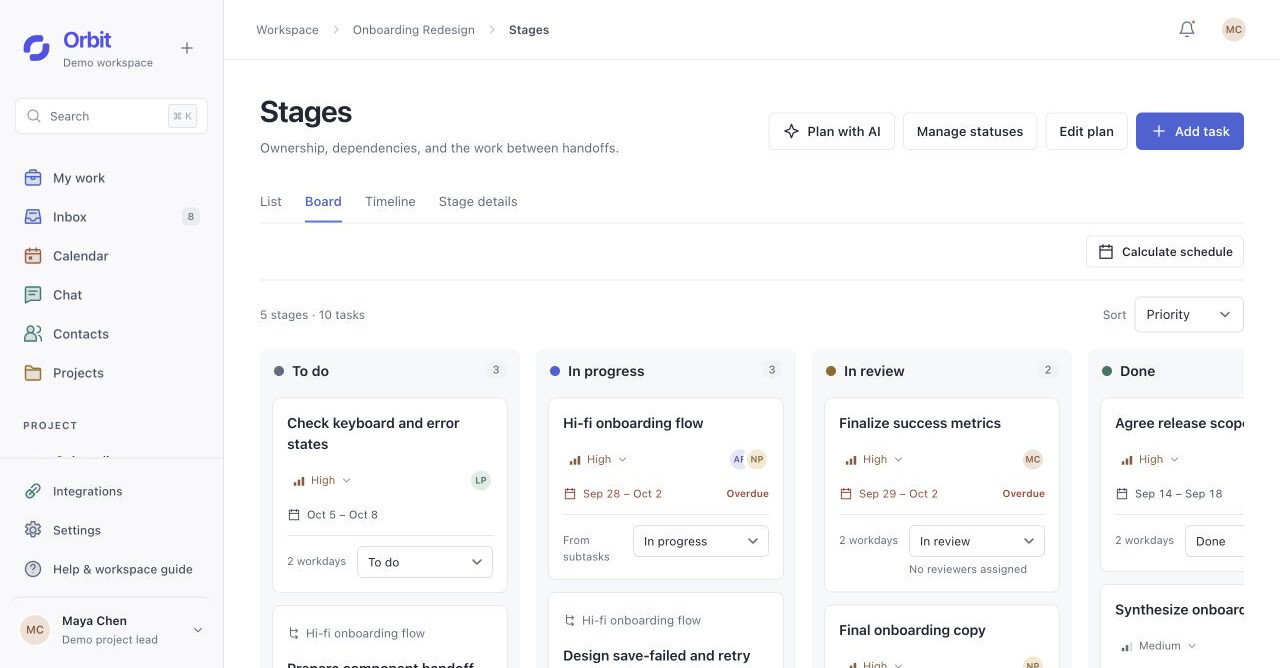
Product interface replay · sample project
Make constraints visible
Scheduling uses estimates, dependencies, workdays, and co-assignee availability. Missing estimates remain unscheduled. Suggested dates appear in a preview before the team adopts them.
Give handoffs a decision point
Review progress and unresolved feedback remain visible before the PM confirms a handoff. The next stage starts without erasing the previous stage’s files, discussions, or decisions.
Shared visibility.
Explicit responsibility.
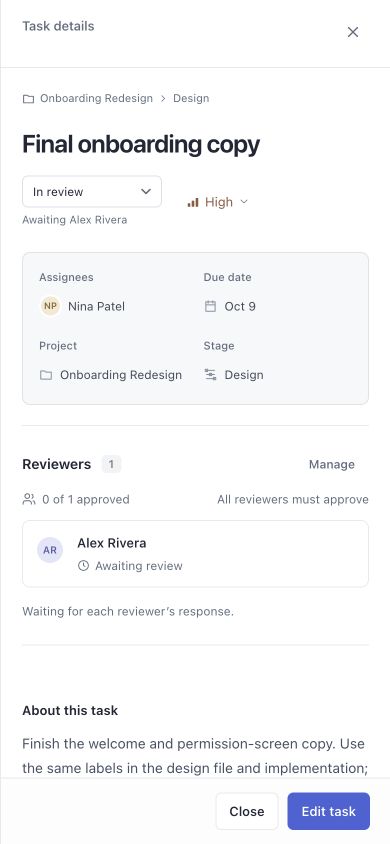
Seeing a task is different from owning, reviewing, or following it. I made those relationships explicit so teammates can understand both the current state and who can take the next action.
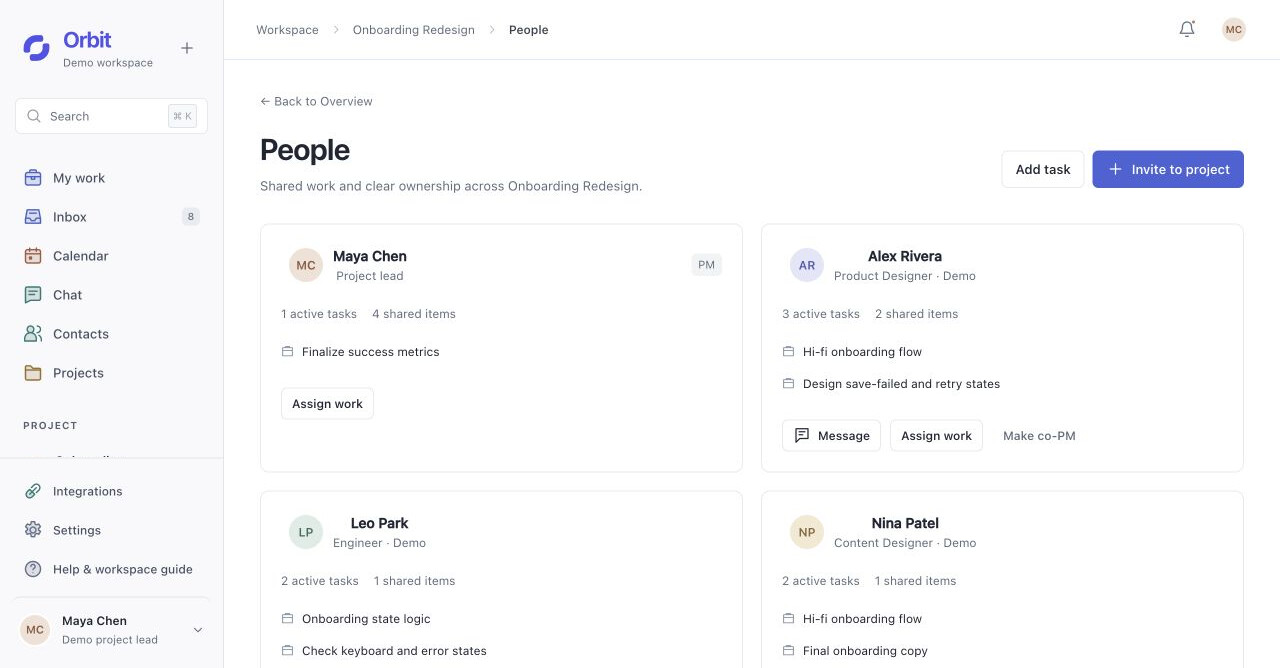
Product interface replay · sample project
- Assignees
- Do the work
Multiple people can own the same task, edit it, and share progress and deliverables.
- Reviewers
- Make feedback explicit
Each reviewer approves or requests changes for themselves. Approval is distinct from task completion.
- Project PM / co-PM
- Coordinate the shared plan
Assign work, manage the plan, and confirm a stage handoff. The team can identify its project lead.
- Followers
- Stay informed
Receive relevant updates without gaining editing rights or becoming an approver.
Keep the feedback
with the work it refers to.
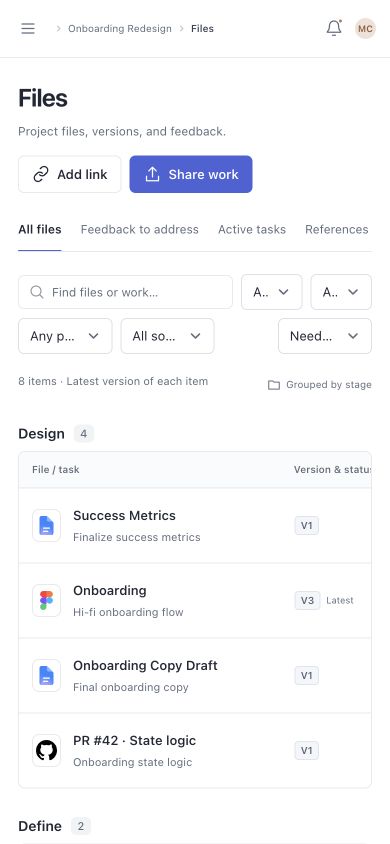
A shared workspace needs more than a file list. Teammates need to know which version a comment refers to, which task it belongs to, and what decision followed.
Deliverable
- File / source linkAttached to the work
- Specific versionA new upload keeps the old version
- Comments & reviewFeedback retains its original context
Conversation
- Chat / meetingLink the relevant work
- Message / meeting recordPreserve the source
- Decision & update historyKeep the reason for the change
A new version should not rewrite an old conversation
If a chat attachment points to version 1, uploading version 2 does not replace that attachment. The original comment still makes sense when someone returns later.
Likewise, reviewer approval and task completion stay separate. A new upload does not silently inherit the previous version’s approval.
Shared in chatOriginal attachment + feedback retained
New version uploadedNew work available for review
Watch one handoff
move through the system.
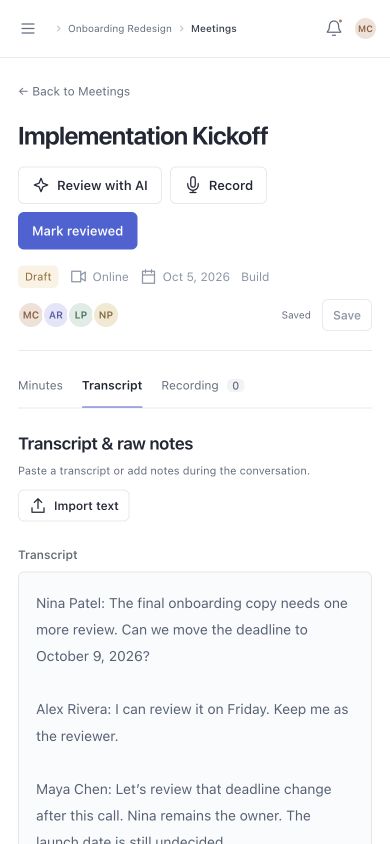
Follow a meeting through review and confirmation to a task update, then continue with the same work on mobile.
Original AI-generated cast and scenes, edited with captures of the working product. Fictional team and project; prepared transcript.
Read the film description
- 0:00An original AI-generated team scene leads into an online meeting in Orbit. Instrumental music accompanies the film.
- 0:14Leaving the call opens a meeting-ended screen. The user opens this meeting’s notes and reviews a prepared transcript with AI.
- 0:25In chat, the user requests a new deadline for Final onboarding copy. AI proposes October 9 and shows the source of the request.
- 0:36The user confirms the proposal. The task updates to October 9, keeping its owner and reviewer.
- 0:40The updated task appears on mobile, followed by other responsive product screens. The film closes with the Orbit identity.
After the meeting review
Turn a suggestion into
shared direction.
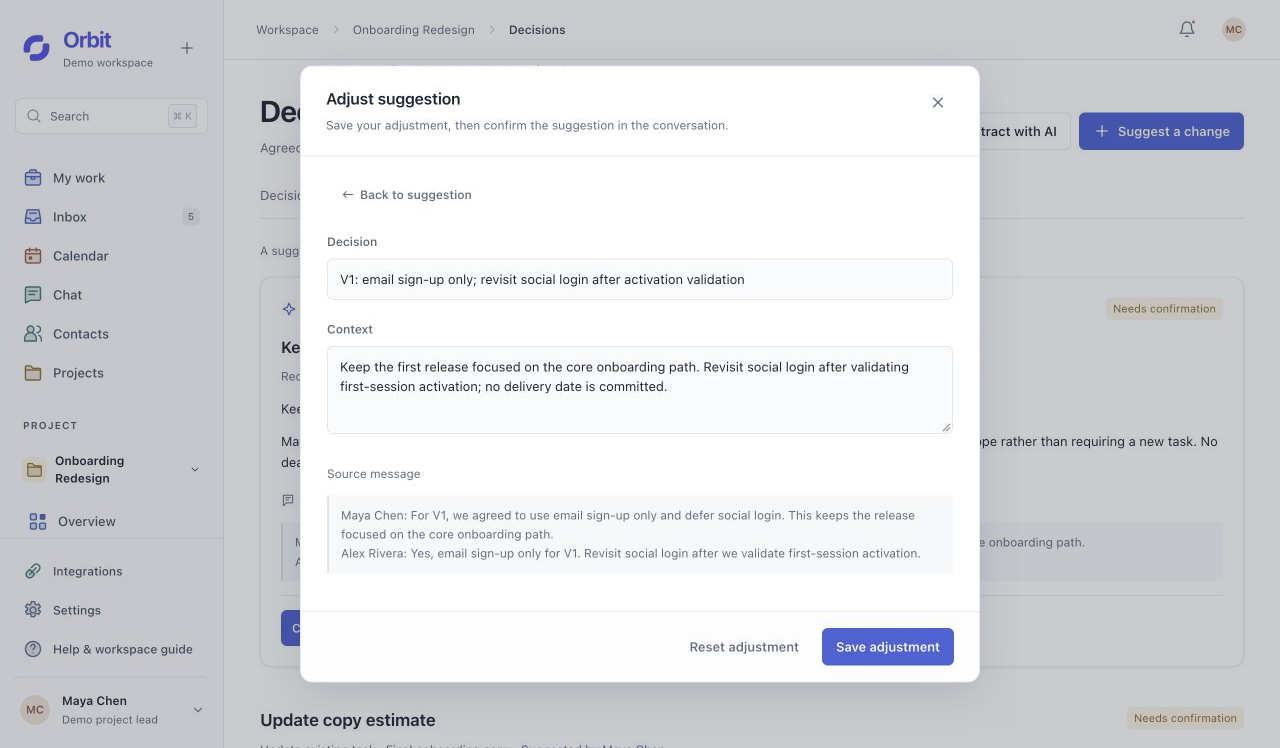
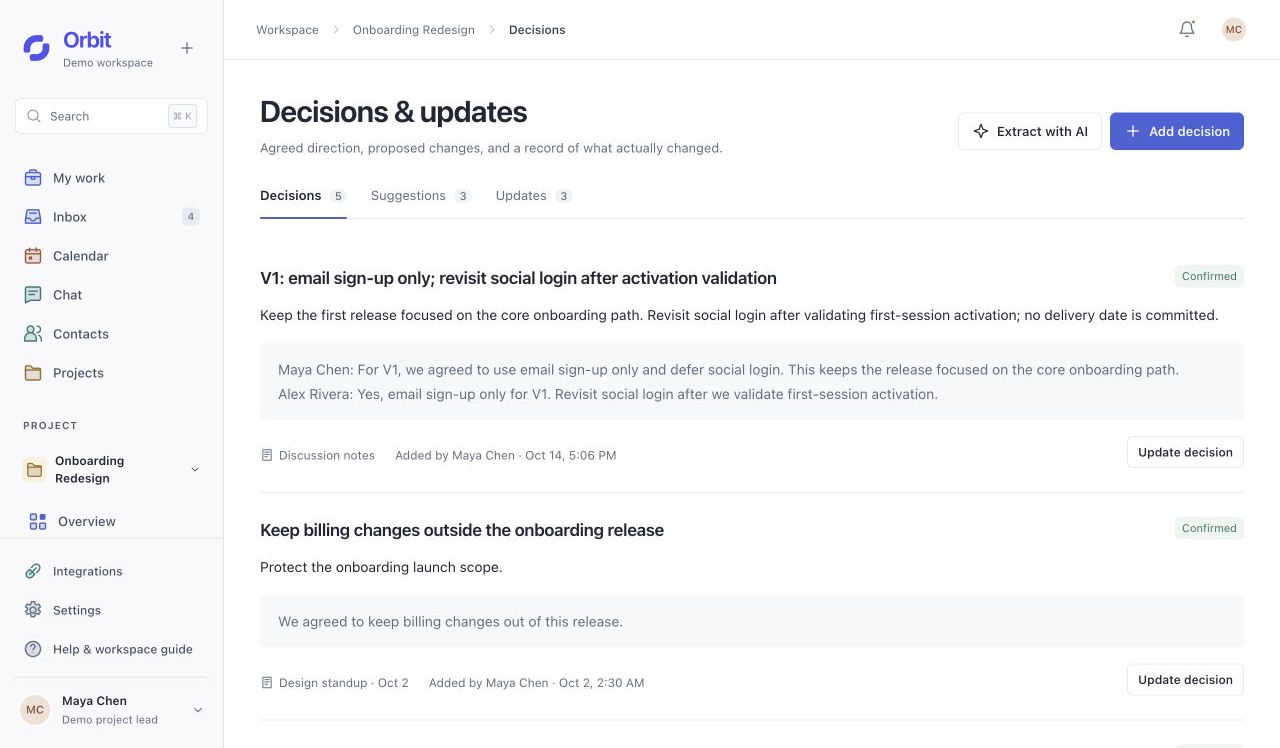
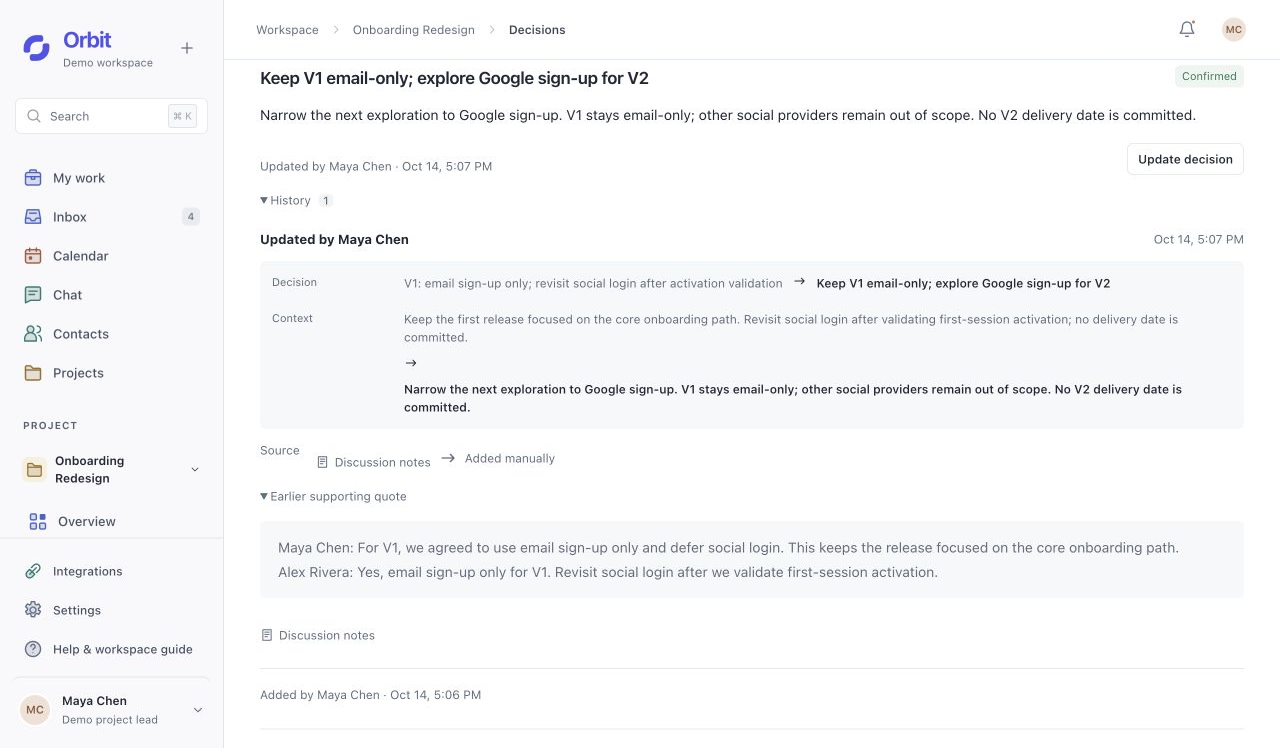
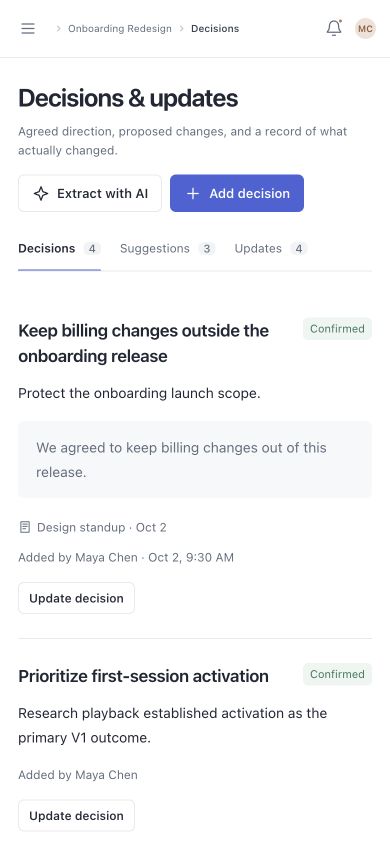
A scope decision needs a place beyond the meeting notes. Here, “defer social login” becomes a project decision the team can refine, confirm, and later revise.
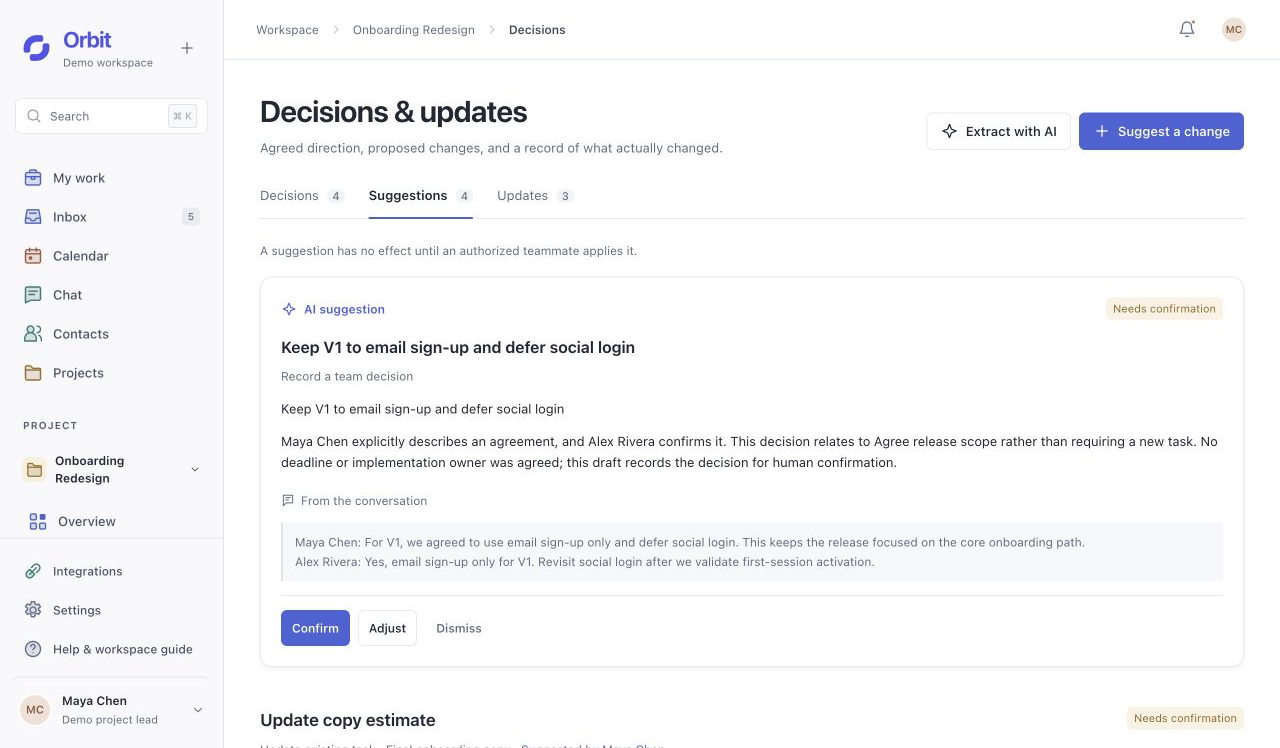
Keep the release boundary explicit.
AI extracts “email sign-up only for V1” from the discussion. The original wording remains visible while the proposal is still pending.
Make the change visible
before it becomes a commitment.
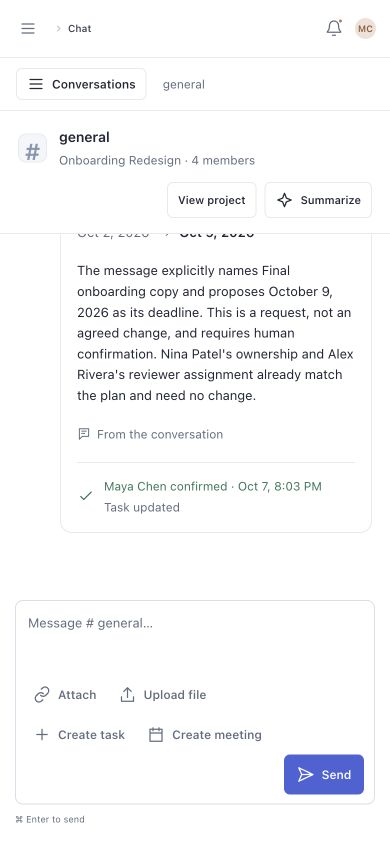
A proposal stays pending until it is confirmed. The interaction separates its source, permission to act, and the resulting update.
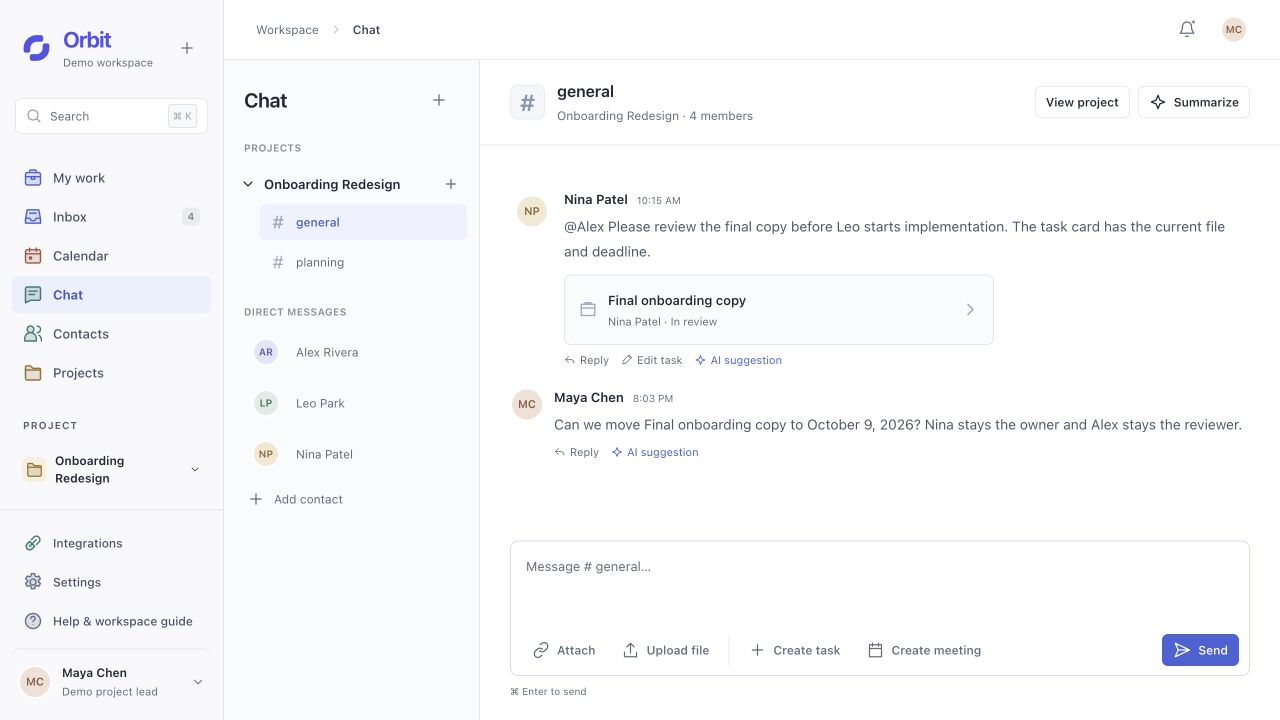
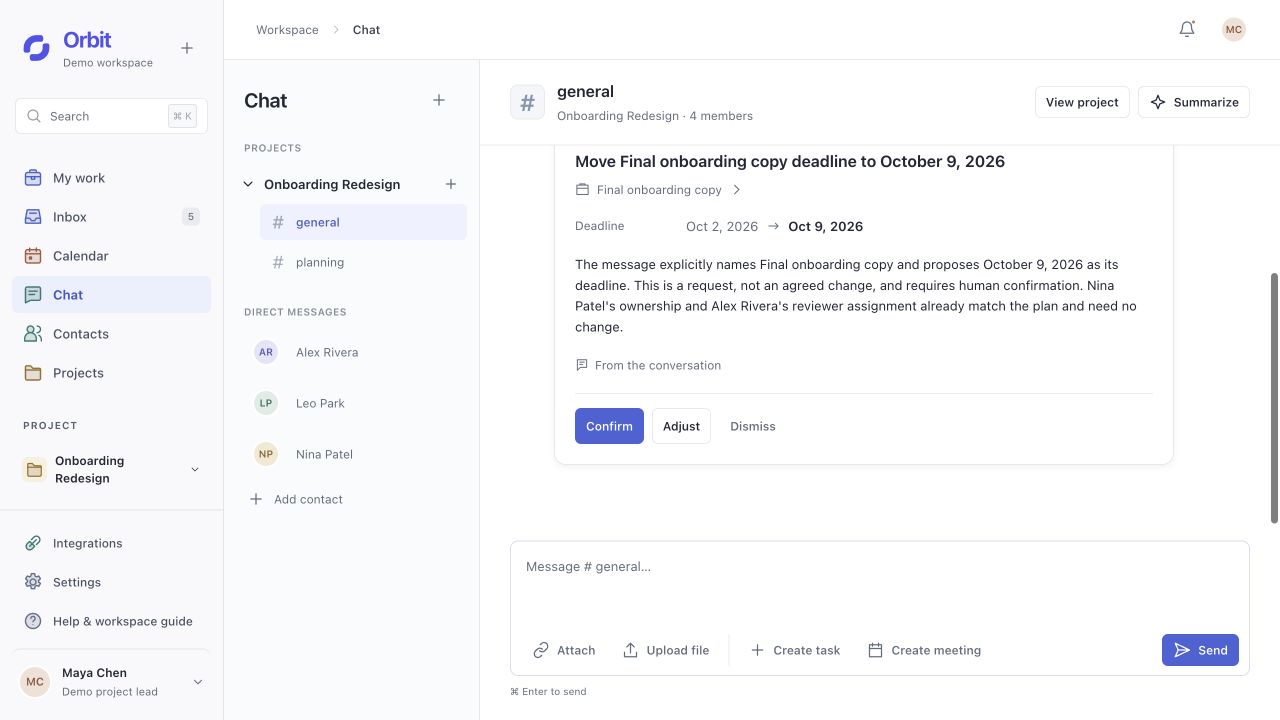
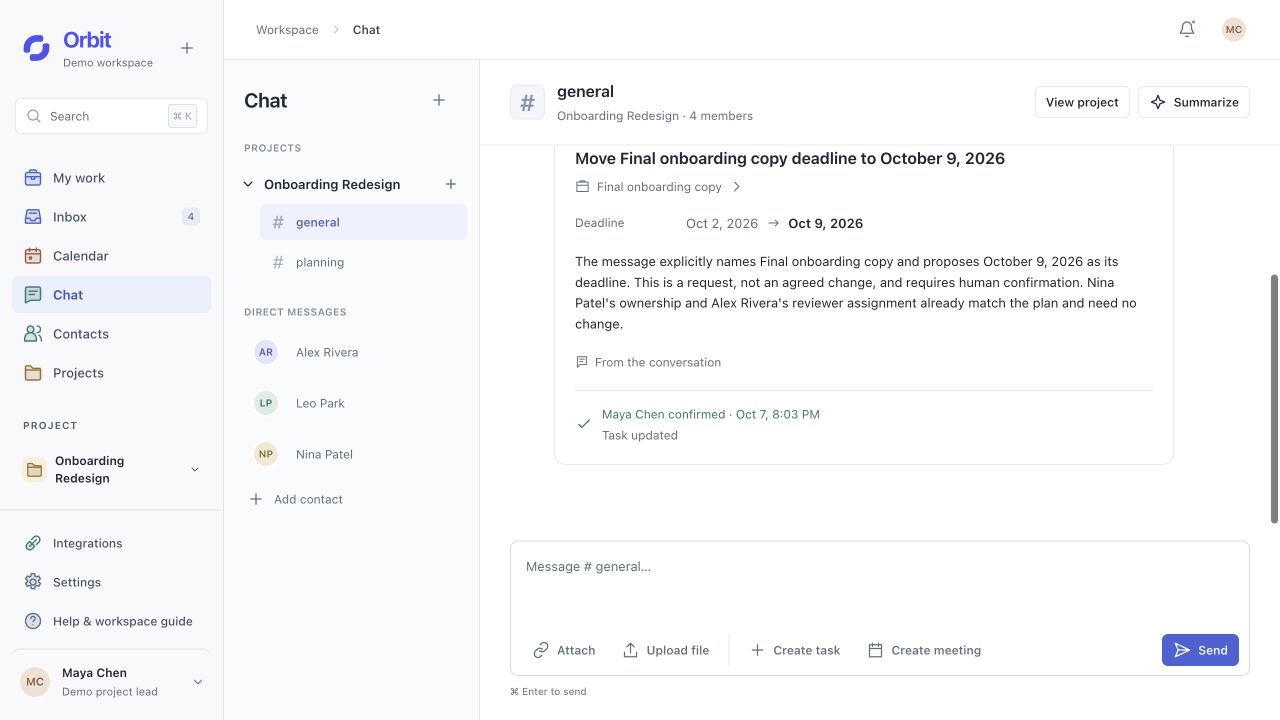
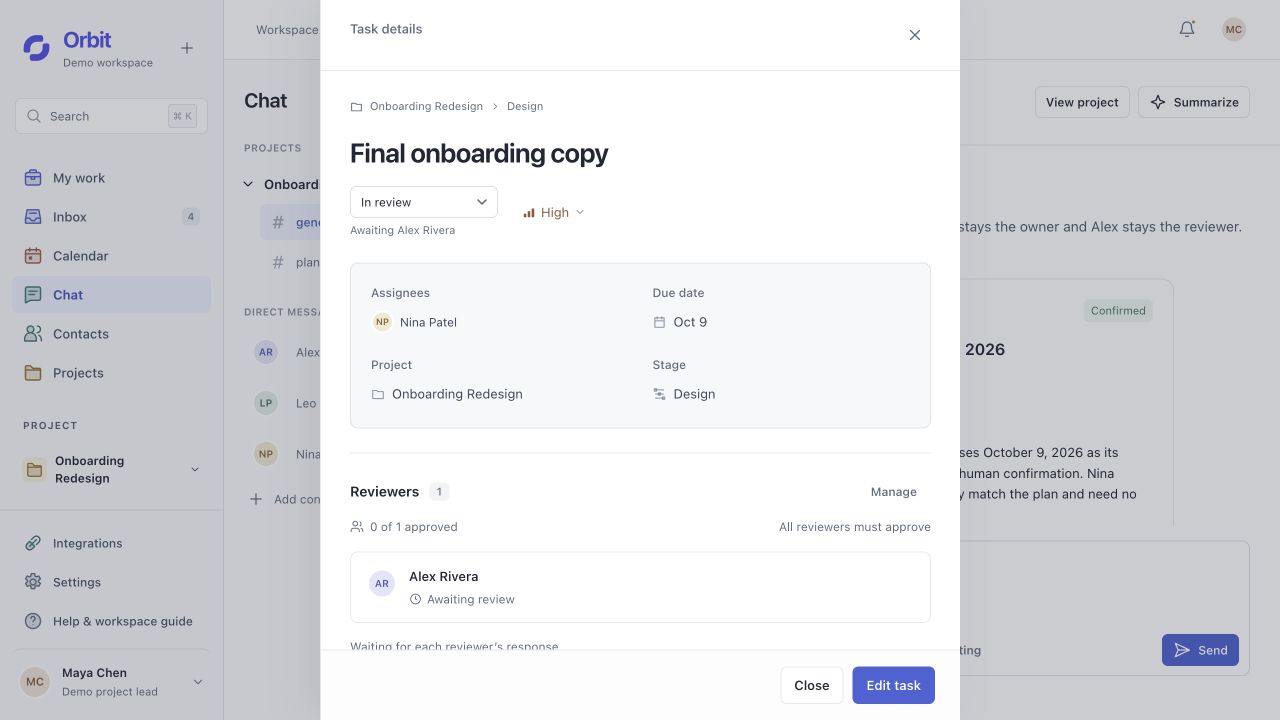
Request a new deadline while keeping the same owner and reviewer.
Inspect the evidence
The proposal links to its source conversation, so the suggested edit can be checked before it is applied.
Make authority explicit
Reading a suggestion does not approve it. Confirm, Adjust, and Dismiss stay with the proposal; applying a change requires permission.
Preserve responsibility
A date edit keeps the task’s owner and reviewer. The update records who confirmed it.
The work travels
with the team.
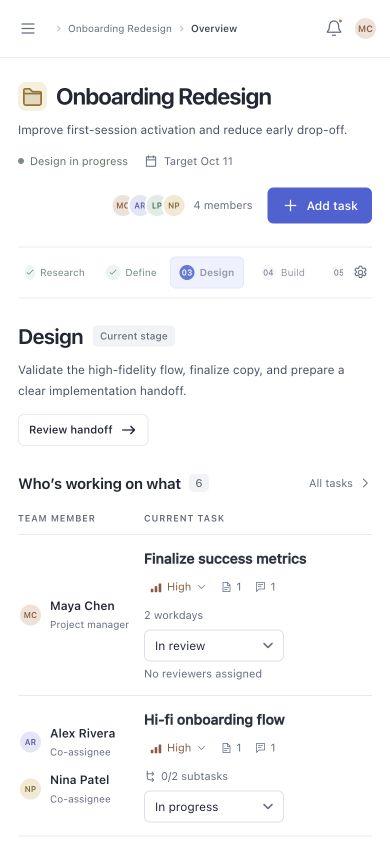
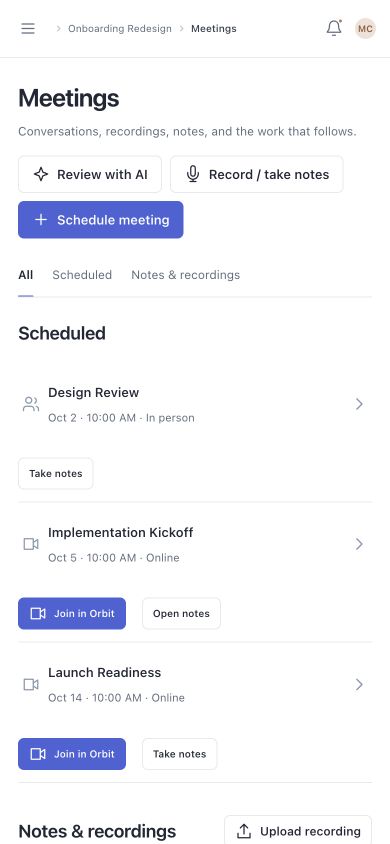
On a smaller screen, task ownership, review state, and the next action stay visible. The responsive web experience keeps the same project context.
IA iterations
Three decisions that
reshaped the structure.
The early prototype already contained the main features. The harder question was what should sit together, what needed its own context, and which distinctions the team should never have to infer.
Navigation scope
Give personal work and shared work different entry points.
The early layout put a personal updates rail beside the project overview. That asked one screen to answer both “What needs my attention?” and “Where is the team?” I gave those questions distinct homes so personal urgency would not determine the hierarchy of shared project information.
- Earlier structure
- Home and the project Overview coexisted; a personal rail repeated focus items and pending updates beside shared work.
- Structural change
- Made Home explicitly Projects, retained cross-project responsibilities in My work and Inbox, and removed the persistent personal rail from Overview. The selected project now owns its own navigation and shared context.
Trade-offPersonal updates require returning to a dedicated entry. I accepted that extra navigation to keep the project overview focused on the same shared questions for every teammate.
Primary organizing unit
Make the stage organize the work, not just describe progress.
The first overview was built around each person’s current focus, while stages described the project journey separately. That structure explained who was busy, but made the team reconstruct which tasks, deliverables, and unresolved feedback belonged to the same phase. I made stage context the organizing layer of Overview.
- Earlier structure
- A person → current focus table, with recent files and a separate stage-detail page.
- Structural change
- Selecting a stage now scopes its team tasks, shared work, feedback, and decisions together. Tasks became the shared records that connect these views; People and My work are alternative ways to reach the same work.
Trade-offThis adds a level between project and task. I kept direct task entry points for daily work, while stage browsing remains separate from the PM’s decision to advance the project.
Meaning & information states
Separate what was proposed, agreed, and actually changed.
The early Decisions area included proposed items distinguished by a status label. A discussion can contain a request, an agreement, and a later change; grouping them as decisions makes readers interpret how much authority each item carries. I made that distinction part of the information model.
- Earlier structure
- Proposed and agreed items appeared in the Decisions list; pending updates also lived in personal update cards.
- Structural change
- Defined Suggestions as pending proposals, Decisions as agreed direction, and Updates as saved changes. Conversation records remain the source; a suggestion points to the affected work, and confirmation connects it to the resulting update.
Trade-offThree categories take more explanation than one activity feed. I kept them in the project context so the team can distinguish agreement from execution without adding a separate AI destination.
Business model exploration
A subscription built
around team follow-through.
After building the core experience, I explored how Orbit could become a sustainable SaaS product. This is a model to test, with pricing and willingness to pay still unvalidated.
Teams pay for shared visibility, clear ownership, and reliable handoffs that reduce the need to chase context.
- Start with a focused team
Small product teams and design studios
Initial segment hypothesis: teams of 5–20 people coordinating recurring reviews and handoffs. Contributors use Orbit; a team lead or studio owner sponsors the purchase.
- Charge for ongoing collaboration
Team subscription + shared AI allowance
Candidate model: monthly billing per full member, with AI usage pooled across the workspace. Limited guest review access could reduce the friction of inviting clients. Exact prices remain open.
- Make the value easy to try
One project, one complete loop
A sample project introduces the workflow before a team imports its own work. A proposed activation signal is assigning shared work, exchanging feedback on a deliverable, and completing a review or handoff. AI usage is a supporting signal.
- Keep the model sustainable
Predictable access, visible consumption
Model requests, call infrastructure, and stored media create ongoing costs. A shared allowance and optional usage add-ons need testing. Source inspection and human confirmation stay part of the core experience.
What I would test next
- Buyer interviewsFind where context, ownership, or version confusion becomes costly enough to justify another tool.
- A small team pilotObserve repeated use, corrections, and whether follow-up actually becomes easier.
- Willingness to pay + costCompare seat and workspace pricing with measured AI, meeting, and storage usage.
The relationships
are the product.
The key design decision was to connect work through a stable project structure, then make responsibility, evidence, and changes visible within it. AI became useful because the relationships and decision boundaries were already clear.
What works today
A persistent workspace connects planning, co-assignment, file versions, feedback, review, and stage handoffs. The public demo gives each visitor an isolated sample project, with the same workflow on desktop and mobile.
What still needs evidence
Real-team testing still needs to check whether people can find the right version, identify the next owner, and complete a handoff. Model accuracy, repeat adoption, and willingness to pay also remain open. Multi-person calling still needs cross-network validation. No measured efficiency or revenue outcomes are claimed.
OrbitTake the next step yourself.
Explore a sample project: find who owns a task, inspect its shared files, follow the meeting record, and optionally review an AI suggestion.
Try OrbitYour edits stay in your own sample workspace. AI availability depends on the demo allowance.