 Orbit
OrbitShared work.
A clearer picture.
A collaboration workspace connecting people, plans, files, and decisions, so everyone can see how the work moves forward.
- Project
- Independently designed & built SaaS product
- My role
- Product definition, IA, UX/UI, implementation direction
- Scope
- Team workflows · Desktop & mobile
- Timeline
- October 2026
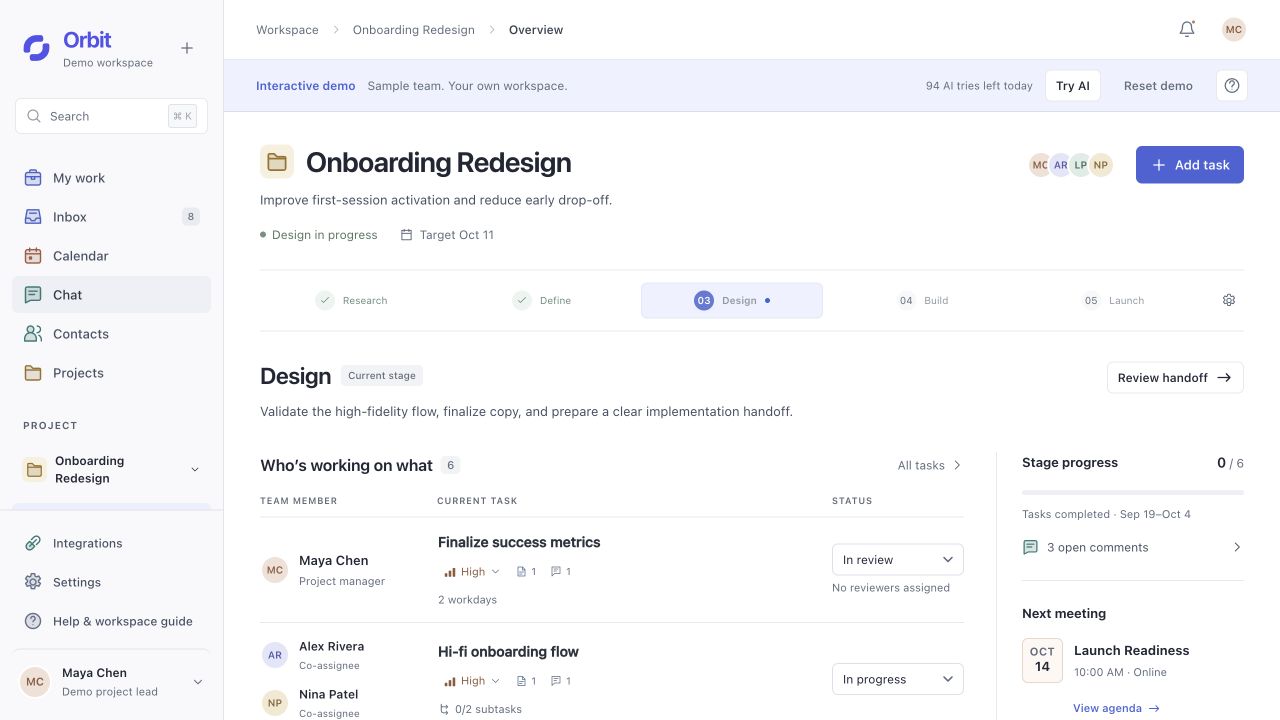
I designed the information architecture, collaboration rules, and interfaces, and directed implementation with Codex. The working product connects planning, shared files, meetings, and AI-assisted updates, with persistent data and responsive desktop and mobile views.
The starting point
Connect the work.
Make collaboration visible.
Orbit grew out of my experience working in a studio: discussing work in meetings, agreeing responsibilities, sharing files, and iterating each week. When these activities sit in separate places, teammates have to piece together who owns the work, which version is current, and what happens next.
I built Orbit around a shared project structure. Stages connect the plan to tasks; tasks connect people to files and feedback; meetings and conversations retain the reasons behind decisions. AI helps organize this information, while people keep control of changes to the work.
Each piece of work should make three things clear: who owns it, where it stands, and who takes the next step.
Screens and interactions come from the working product. The onboarding project uses sample data for demonstration.
Information architecture
A personal way in.
A shared project underneath.
I separated workspace navigation from project navigation. A teammate can find their own work across projects, then move into one project without losing its people, stage, or history.
- My workMy responsibilities
- InboxUpdates needing attention
- CalendarPersonal and shared time
- ChatProject channels and DMs
- ContactsPeople I connect with
- ProjectsProjects I have joined
- OverviewWhere are we now?
- StagesWhat is the plan?
- FilesWhich work are we reviewing?
- MeetingsWhat did we discuss?
- PeopleWho is doing what?
- Decisions & updatesWhat changed, and why?
Persistent accessSearch · Settings · Integrations · Help · Account
Organize around the work
Project → stage → task gives each piece of work a place. Files, feedback, and meeting records link back to that context instead of becoming isolated destinations.
Separate connection from access
Contacts support relationships and private conversation. Joining a project is a separate, accepted invitation. Knowing someone does not expose their other projects.
Offer more than one way back
A task can be reached from My work, a stage, a person, or an attached chat message. These entry points open the same task, preserving its identity and history.
See the plan.
Find your part in it.
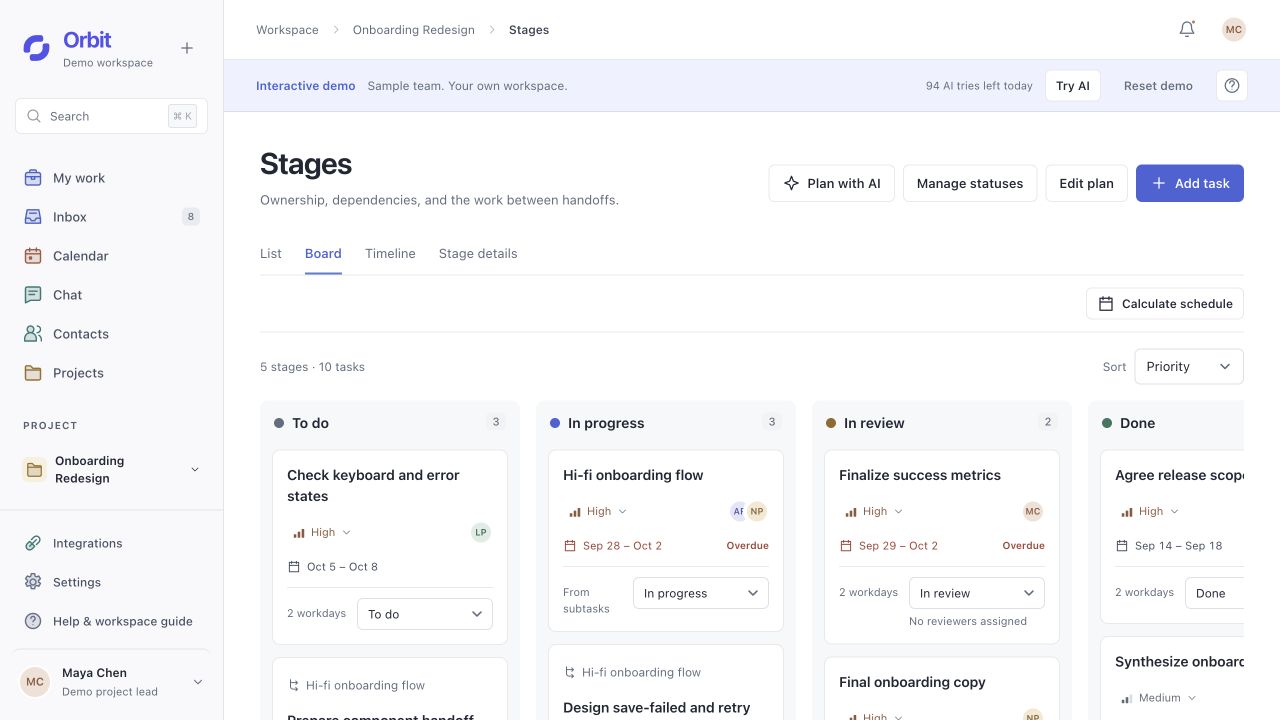
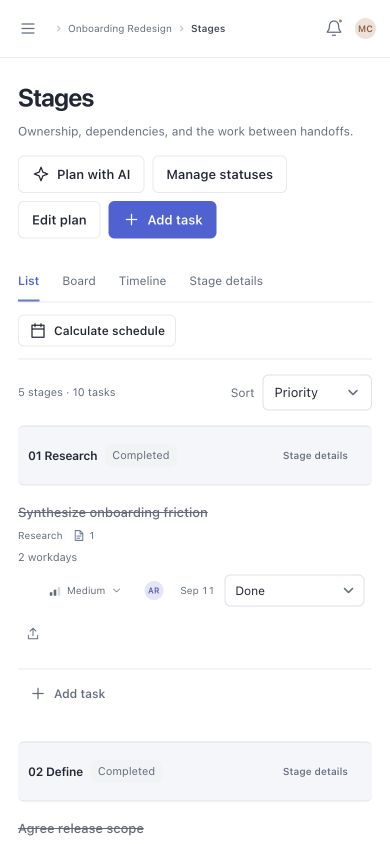
Orbit supports daily teamwork as well as PM coordination. Overview shows the current stage and who is working on what. Stages makes the plan inspectable through a list, board, or timeline of the same tasks.
Make constraints visible
Scheduling uses estimates, dependencies, workdays, and co-assignee availability. Missing estimates remain unscheduled. Suggested dates appear in a preview before the team adopts them.
Give handoffs a decision point
Review progress and unresolved feedback remain visible before the PM confirms a handoff. The next stage starts without erasing the previous stage’s files, discussions, or decisions.
Shared visibility.
Explicit responsibility.
Seeing a task is different from owning, reviewing, or following it. I made those relationships explicit so teammates can understand both the current state and who can take the next action.
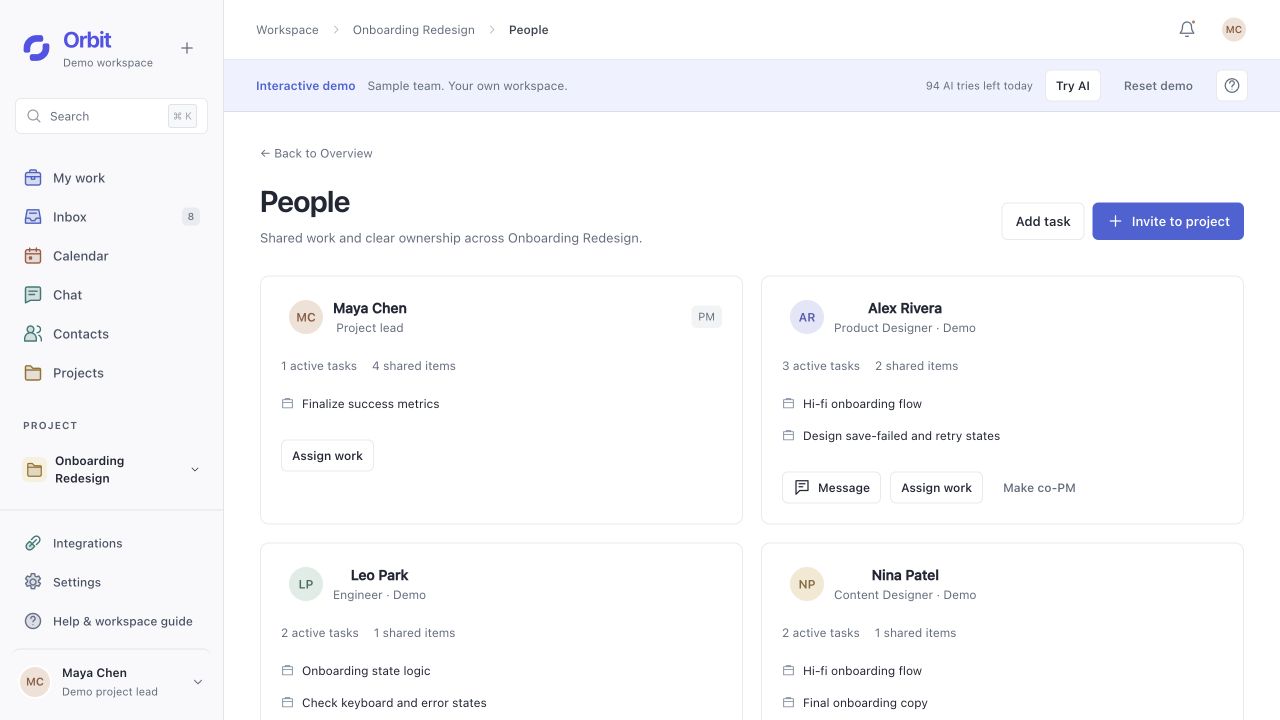
- Assignees
- Do the work
Multiple people can own the same task, edit it, and share progress and deliverables.
- Reviewers
- Make feedback explicit
Each reviewer approves or requests changes for themselves. Approval is distinct from task completion.
- Project PM / co-PM
- Coordinate the shared plan
Assign work, manage the plan, and confirm a stage handoff. The team can identify its project lead.
- Followers
- Stay informed
Receive relevant updates without gaining editing rights or becoming an approver.
Keep the feedback
with the work it refers to.
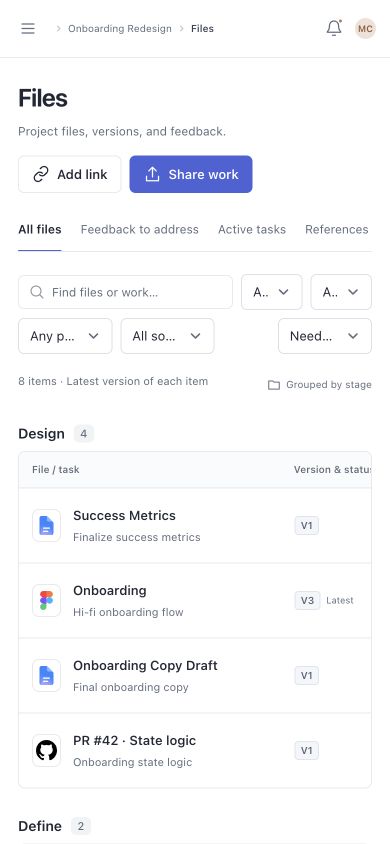
A shared workspace needs more than a file list. Teammates need to know which version a comment refers to, which task it belongs to, and what decision followed.
Deliverable
- File / source linkAttached to the work
- Specific versionA new upload keeps the old version
- Comments & reviewFeedback retains its original context
Conversation
- Chat / meetingLink the relevant work
- Message / meeting recordPreserve the source
- Decision & update historyKeep the reason for the change
A new version should not rewrite an old conversation
If a chat attachment points to version 1, uploading version 2 does not replace that attachment. The original comment still makes sense when someone returns later.
Likewise, reviewer approval and task completion stay separate. A new upload does not silently inherit the previous version’s approval.
Shared in chatOriginal attachment + feedback retained
New version uploadedNew work available for review
Watch one handoff
move through the system.
With the shared structure in place, the film follows a meeting into notes, a proposed change, human confirmation, and the updated task on mobile.
Original AI-generated cast and scenes, edited with captures of the working product. Fictional team and project; prepared transcript.
Read the film description
- 0:00An original AI-generated team scene leads into an online meeting in Orbit. Instrumental music accompanies the film.
- 0:14Leaving the call opens a meeting-ended screen. The user opens this meeting’s notes and reviews a prepared transcript with AI.
- 0:25In chat, the user requests a new deadline for Final onboarding copy. AI proposes October 9 and shows the source of the request.
- 0:36The user confirms the proposal. The task updates to October 9, keeping its owner and reviewer.
- 0:40The updated task appears on mobile, followed by other responsive product screens. The film closes with the Orbit identity.
AI within the collaboration flow
Help the team follow through.
Keep decisions with people.
AI helps draft plans, summarize discussions, and propose changes within the existing project structure. The team can still create, assign, review, and complete work manually. This meeting-to-task sequence shows where AI assists.
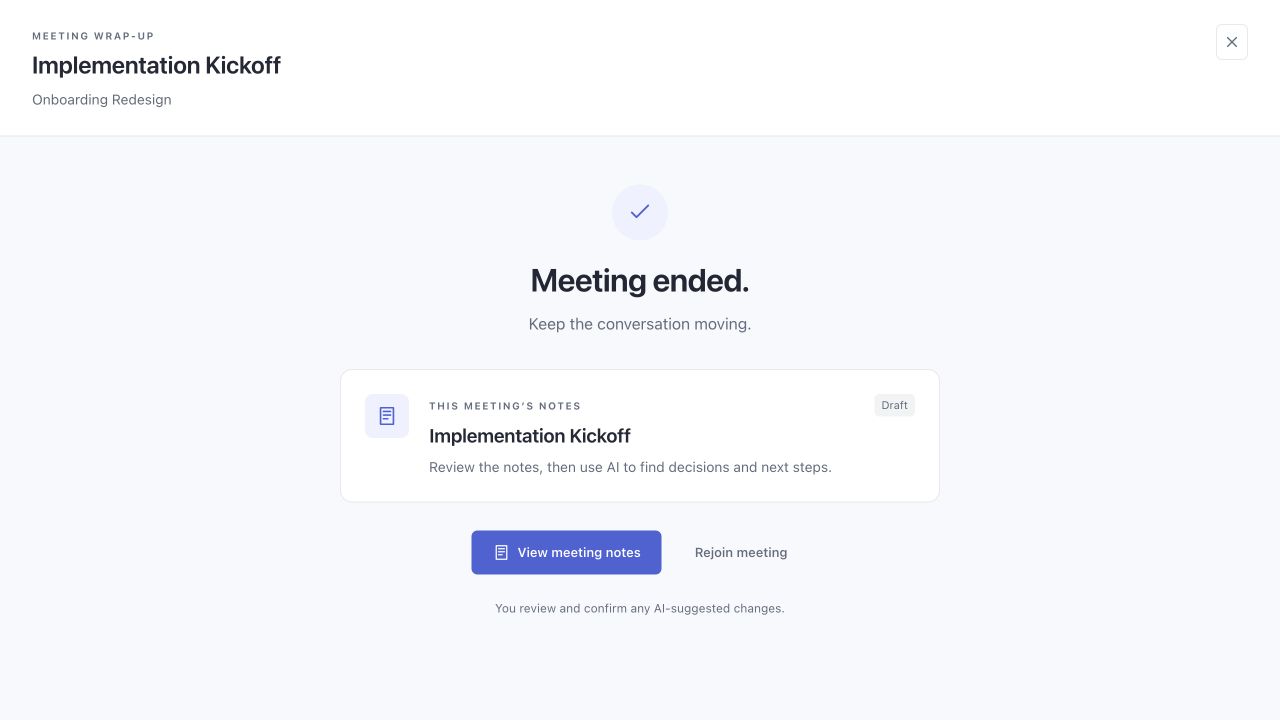
Leave the callThe end of a meeting becomes a handoff. The exit screen takes people directly to this meeting’s notes.Open the screen to inspect details ↗
The demo reviews supplied text. Automatic transcription of an entire online call is not part of the current implementation.
Make the change visible
before it becomes a commitment.
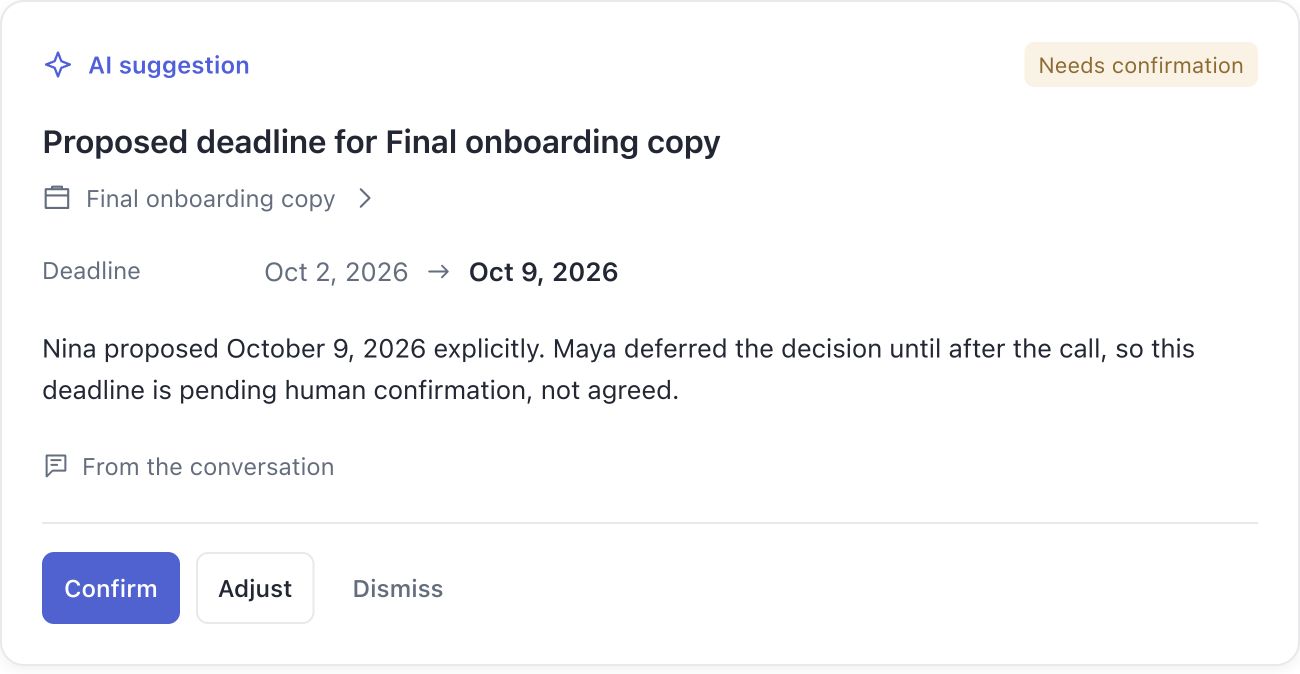
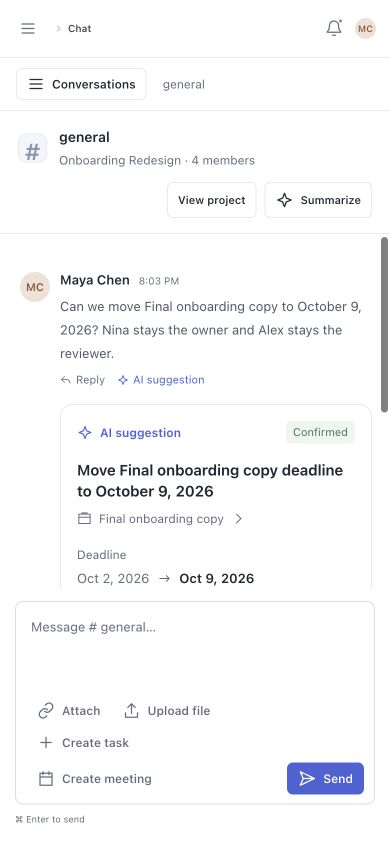
“Can we move the deadline to October 9?” creates a proposal. The task changes only after an authorized person confirms it.
Inspect the evidence
The source conversation remains accessible, so an inferred change can be checked against what was actually said.
Keep control local
Confirm, Adjust, and Dismiss sit with the proposal. Reading a notification never counts as approving a change.
Preserve responsibility
Changing a date does not silently replace the owner or reviewer. Confirmation records who applied the update.
The work travels
with the team.
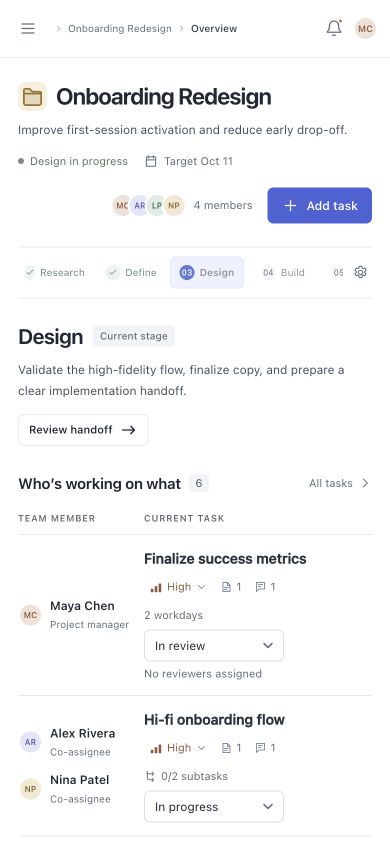
On a smaller screen, task ownership, review state, and the next action stay visible. The responsive web experience keeps the same project context.
Running it changed
the design.
Testing the working product exposed gaps that static screens could hide. I used these findings to improve permissions, handoffs, and feedback throughout the flow.
Adding a contact implied access to every project.
Separated contact connections from accepted project invitations and made project roles explicit.
Viewing a past stage could be confused with advancing the project.
Separated browsing from the PM-confirmed handoff and kept the current stage visible.
Leaving a call broke the flow.
Added an end-of-call screen that opens this meeting’s notes directly.
Summarize could feel unresponsive.
Made progress, failures, and saved results visible; added summaries to direct messages.
“Mark all read” felt like approval.
Removed the bulk-read button and kept approval attached to each suggestion.
Business model exploration
A subscription built
around team follow-through.
After building the core experience, I explored how Orbit could become a sustainable SaaS product. This is a model to test, with pricing and willingness to pay still unvalidated.
Teams pay for shared visibility, clear ownership, and reliable handoffs that reduce the need to chase context.
- Start with a focused team
Small product teams and design studios
Initial segment hypothesis: teams of 5–20 people coordinating recurring reviews and handoffs. Contributors use Orbit; a team lead or studio owner sponsors the purchase.
- Charge for ongoing collaboration
Team subscription + shared AI allowance
Candidate model: monthly billing per full member, with AI usage pooled across the workspace. Limited guest review access could reduce the friction of inviting clients. Exact prices remain open.
- Make the value easy to try
One project, one complete loop
A sample project introduces the workflow before a team imports its own work. A proposed activation signal is assigning shared work, exchanging feedback on a deliverable, and completing a review or handoff. AI usage is a supporting signal.
- Keep the model sustainable
Predictable access, visible consumption
Model requests, call infrastructure, and stored media create ongoing costs. A shared allowance and optional usage add-ons need testing. Source inspection and human confirmation stay part of the core experience.
What I would test next
- Buyer interviewsFind where context, ownership, or version confusion becomes costly enough to justify another tool.
- A small team pilotObserve repeated use, corrections, and whether follow-up actually becomes easier.
- Willingness to pay + costCompare seat and workspace pricing with measured AI, meeting, and storage usage.
The relationships
are the product.
The key design decision was to connect work through a stable project structure, then make responsibility, evidence, and changes visible within it. AI became useful because the relationships and decision boundaries were already clear.
What works today
A local, persistent workspace connects planning, co-assignment, file versions, feedback, review, and stage handoffs. Real AI calls support selected steps, with a shared desktop and mobile workflow.
What still needs evidence
Real-team testing still needs to check whether people can find the right version, identify the next owner, and complete a handoff. Model accuracy, repeat adoption, and willingness to pay also remain open. Public calling also needs deployment and cross-network validation. No measured efficiency or revenue outcomes are claimed.
OrbitTake the next step yourself.
Explore a sample project: find who owns a task, inspect its shared files, follow the meeting record, and optionally review an AI suggestion.
Public demo coming soonThe current demo runs locally. A public version is planned for the portfolio launch.